ePaper weather dashboard with XIAO EE05 and SenseCraft Seeedash
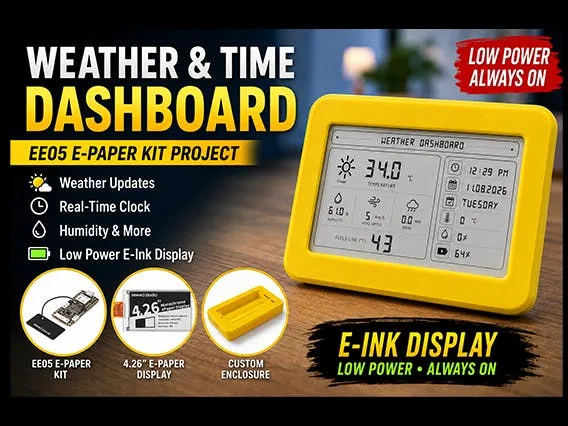
An ePaper weather dashboard turns any room into an environmental observation point. The project uses the Seeed Studio XIAO EE05 board, based on the ESP32-S3, and a 4.26-inch monochrome ePaper display with 800×480 pixel resolution. The no-code SenseCraft Seeedash platform handles the interface, so no coding is needed for the layout. The result is a compact device that shows temperature, humidity, weather conditions, wind speed, rain, time, date, day, and battery status.
The workflow simplifies everything. The project page by iotprojectsideas connects the display to the EE05 via a 24-pin FPC connector. The board connects to the computer via USB-C, and firmware is flashed with the online SenseCraft Seeedash Firmware Flasher tool. After flashing, the display shows a QR code that, when scanned with a smartphone, opens the Wi-Fi configuration interface. In a few seconds the device joins the network and is added to the SenseCraft Seeedash workspace.
Design the ePaper weather dashboard with drag-and-drop
Interface design happens entirely in the SenseCraft Seeedash environment. You drag widgets for each weather data point, arrange them on the 800×480 pixel canvas, and push the dashboard to the device over Wi-Fi. The process is immediate and requires no programming skills. The platform also handles future updates, so you can modify the layout at any time and send it back to the board.
- Connect the ePaper display to the EE05 board via the 24-pin FPC connector
- Flash the firmware with the online SenseCraft Seeedash Firmware Flasher tool
- Scan the QR code and configure the Wi-Fi network
- Add the device to the SenseCraft Seeedash workspace
- Design the dashboard with drag-and-drop and deploy it over Wi-Fi
The monochrome ePaper display consumes very little power, so the device can run for a long time even on a small battery. The 800×480 resolution ensures excellent readability, even from a distance. The EE05 board supports displays from 1.54 inches up to 7.5 inches, so you can adapt the project to larger or smaller screens. For those who want to experiment, alternatives include the ESP32 module with a 2.8-inch TFT touch display, or more compact OLED displays.
Assembly and 3D-printed enclosure
Once the software configuration is complete, you move to the physical part. The device is assembled in a 3D-printed enclosure, which gives it a finished product look. The case protects the board and display, leaving only the ePaper surface visible. Assembly takes about 4 hours, including printing and wiring. The result is a sturdy, portable object, ideal for a desk, kitchen, or lab.
Component choice is key. The XIAO EE05 board integrates the ESP32-S3 chip, which offers Wi-Fi and Bluetooth LE connectivity. This combination makes it perfect for IoT applications. Alternatively, for similar projects, you can consider the ESP32-C6-Zero IoT Development Kit, which supports Wi-Fi 6 and newer protocols. An ESP32 module with a 2.8-inch TFT touch display can also be a solid base if you prefer a color interface.
Why choose an ePaper weather dashboard
The main advantage of this project is the no-code workflow. SenseCraft Seeedash removes the programming barrier, so even a beginner maker can create a professional information display. The ePaper display also holds the image without power, reducing consumption. Finally, the ability to update the dashboard over Wi-Fi keeps the device always current, without having to disassemble it.
The project adapts to many scenarios: a home weather station, environmental monitoring in an office, or a simple information clock. The EE05 board with a 4.26-inch ePaper display offers a great balance between size and readability. With few components and a bit of 3D printing, you get a device that looks store-bought. All without writing a single line of code for the interface.