
Arduino video overlay shield – kit
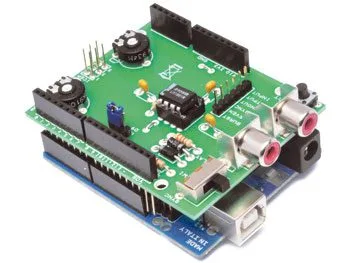
SKU 7100-FT1000KEAN 8219671024082Item type: Kit, Shields & add-onsArduino, Arduino compatible
Description
Shield for Arduino based on the LM1881 IC (from National Semiconductors) that allows overlaying text on a composite video signal (PAL and NTSC). The LM1881 IC extracts synchronization information from PAL and NTSC composite video signals with positive video polarity; as the input video signal voltage level increases, the image brightness increases. To use the shield with Arduino, the TVOut library is available, which greatly simplifies code writing. Arduino manages the vertical sync signal output, the video signal input and output, and the composite video sync signal output.
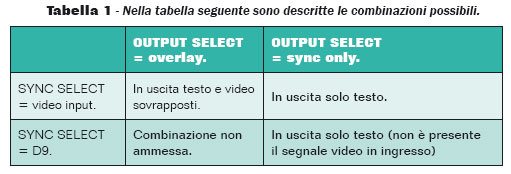
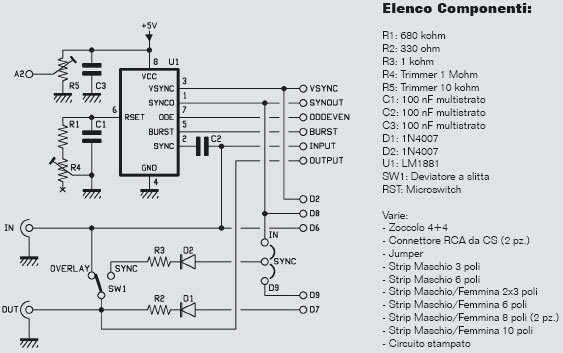
Analog input A2 is connected to a trimmer that allows calibrating the brightness level to be used as a discriminating threshold during video frame capture. The SYNC jumper (SYNCSELECT) allows choosing the source of the video signal synchronization pulse. Normally, the pulse present in the input video signal is used. However, it is also possible to use the circuit without an input video signal by generating the synchronization pulse from software on pin 9 of the Arduino. Switch SW1 (OUTPUT SELECT) allows setting the shield’s behavior regarding the different possibilities of overlaying text on the video signal.
The different possibilities are: output of text overlaid on images, output of images only, output of text only. Clearly, the described possibilities must be compatible and consistent with the overall system configuration; it is not possible, for example, to select the images-only output mode if no video source is present at the input. Finally, as per the Arduino shield standard, all signals are replicated on connectors for custom uses. The signals on the LM1881 IC pins are also replicated separately on the shield. Dimensions: 64×55 mm. Libraries are freely downloadable from the website of the magazine Elettronica IN (www.elettronicain.it).
What’s Missing to Use the Shield
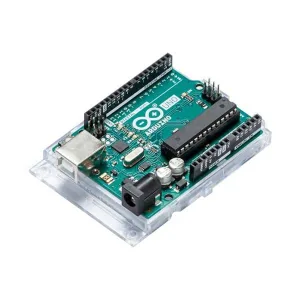
- 7300-ARDUINOUNOREV3
Possible Combinations
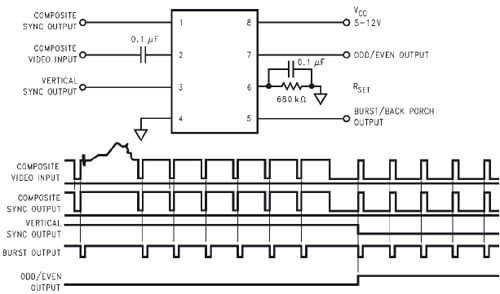
LM1881 IC Connections and Signal Diagram on Respective Pins
The Connections to Arduino Include…
- Pin D2 is connected to the vertical sync signal output from pin 3 of the LM1881.
- Pin D6 is connected to the input video signal, which also goes to pin 2 of the LM1881.
- Pin D7 provides the output video signal.
- Pin D8 is connected to the composite video sync signal output from pin 1 of the LM1881.
- Analog input A2 is connected to potentiometer R5, which allows calibrating the brightness level to be used as a discriminating threshold during video frame capture.
Finally, as per the Arduino shield standard, all signals are replicated on connectors for custom uses. The signals on the LM1881 IC pins are also replicated separately on the shield.
The TVOut Library
To use the shield with the Arduino module, the TVOut library is available, which greatly simplifies code writing. Given an input video signal on pin 2, the following are available on the IC output pins:
Pin 1 provides the composite video sync signal, whose waveform is obtained by removing the video component from the signal on pin 2 and leaving the sync component unchanged; pin 3 provides the vertical sync signal, obtained by integrating the composite video sync signal on pin 1; in other words, the signal changes level at each half-frame, losing horizontal sync information; pin 7 provides a very useful signal for digital image processing with a microcontroller; the signal changes level depending on whether the half-frame (field) being processed is the even or odd field of the same image.
The library also provides a set of functions to dynamically create the most common geometric shapes (lines, circles, polygons, etc.). By alternating sequences of commands, animations and moving graphics can also be created. The library includes some predefined font types, characterized by the pixel dimensions of each character; specifically, fixed-width fonts of sizes 4×6, 6×8, and 8×8 pixels are defined. To use these fonts, simply include them in the program and use them with the appropriate instructions. In addition to predefined fonts, custom fonts can be described and used. Two types of fonts can be defined: fixed-width and variable-width. Each font description is represented, as in a normal C language library, by two files: a header file .h and a file containing the actual font description in .cpp format. Libraries are freely downloadable from the website of the magazine Elettronica IN (www.elettronicain.it).
OSD for UAV with the LM1881 IC
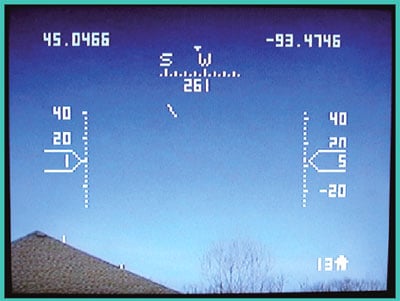
The LM1881 IC and the TVOut library have been considered by the DiyDrones development group to be integrated into the ArduPilotMega project and its evolution APM2 for creating an OSD to integrate into the ground station, exactly like the one presented in the November 2011 issue of Elettronica IN, based on the Sparkfun MAX7456 breadboard. Of course, we will follow the developments of this application and the APM2 platform, which we will not fail to present to you in the magazine Elettronica IN (www.elettronicain.it).
Electrical Schematic
Documentation and Useful Links
You may also like…
-
 Arduino
Related products
-
 Arduino
 -
 Control electronics
 -
 Arduino compatible
 -
 Displays
 -
 Arduino compatible
 -
 Development systems
 -
 Arduino
 -
Sale!
 Arduino compatible