
Audio Shield for Arduino – Solder-Yourself Kit
SKU 8220-KA02EAN 5410329555832Item type: Kit, Shields & add-onsArduino, Arduino compatible
Description
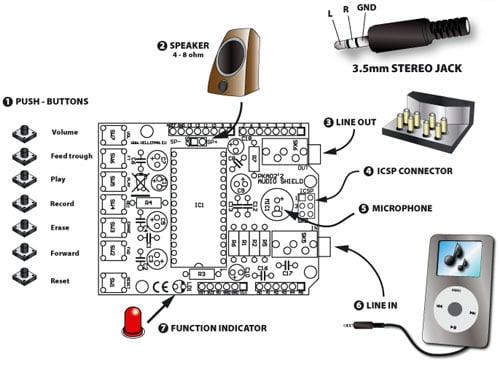
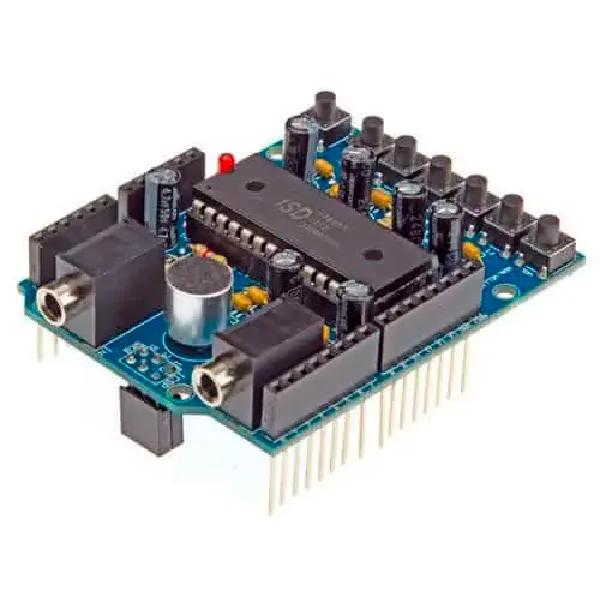
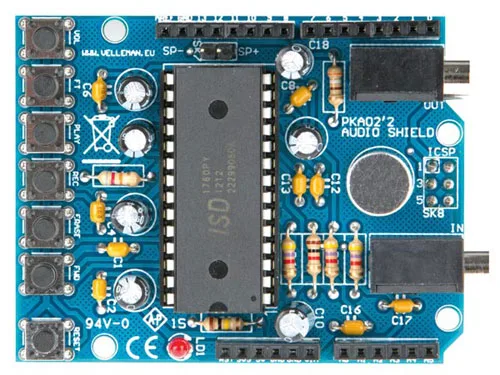
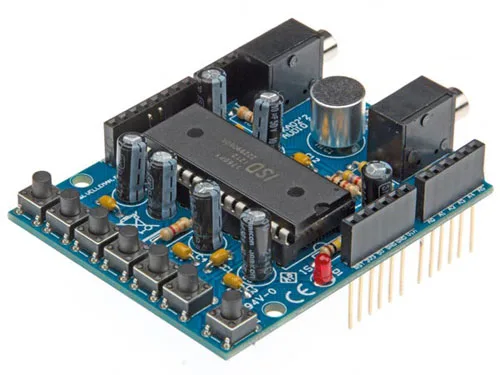
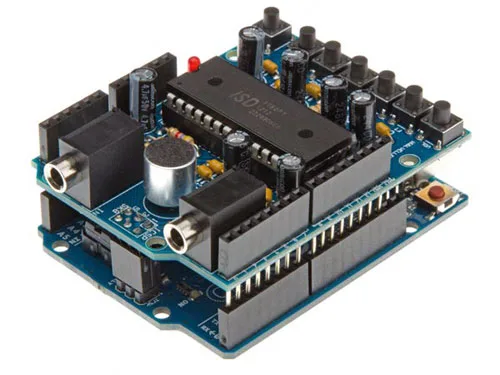
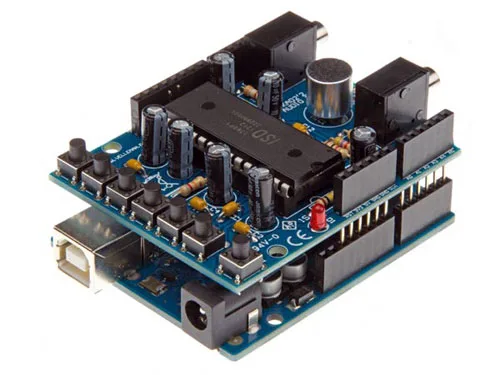
Based on the ISD1760PY chip, this shield for Arduino (Duemilanove, UNO or Mega) allows recording and playback of up to 60 seconds of music and speech. Interfacing with Arduino is made very simple thanks to a dedicated library to load into the sketch, which manages the voice chip. It features various control buttons (REC, PLAY, FWD, ERASE, VOL, etc.), a microphone capsule, a 3.5mm jack for line audio input, and a jack for audio output. Messages can be recorded directly via the microphone capsule; the line input IN can be useful for recording messages or music from an external source (cassette decks, MP3 players, mixers, etc.). The shield draws power from the 5V and GND pins of Arduino. Particularly useful for activating voice messages upon an event in an alarm system, for general I/O control and home automation, or for playing an announcement when a person or vehicle is detected approaching an area. Dimensions (mm): 71×53.
Example sketch
The following sketch allows you to manage the shield’s functions.
#include <ISD1700.h>
ISD1700 chip(10); // Initialize chipcorder with
   // SS at Arduino's digital pin 10

int apc=0;
                     int vol=0; //volume 0=MAX, 7=min

int startAddr=0x10;
                     int endAddr =0x2DF;
                     int inInt=0;
                     void setup()
                     {
   apc = apc | vol; //D0, D1, D2

   //apc = apc | 0x8; //D3 comment to disable output monitor during record

   apc = apc | 0x50; // D4& D6 select MIC REC
   //apc = apc | 0x00; // D4& D6 select AnaIn REC
   //apc = apc | 0x10; // D4& D6 select MIC + AnaIn REC

   apc = apc | 0x80; // D7 AUX ON, comment enable AUD

   apc = apc | 0x100; // D8 SPK OFF, comment enable SPK

   //apc = apc | 0x200; // D9 Analog OUT OFF, comment enable Analog OUT

   //apc = apc | 0x400; // D10 vAlert OFF, comment enable vAlert

   apc = apc | 0x800; // D11 EOM ON, comment disable EOM


   Serial.begin(9600);
   Serial.println("Sketch is starting up");
   }

void loop()
                     {
   char c;

   if(Serial.available())
   {
   /* Power Up */
   chip.pu();
   c = Serial.read();
   switch(c)
   {
   case 'A':
   Serial.println(chip.rd_apc(), BIN);
   break;
   case 'Y':
   chip.play();
   break;
   case 'P':
   chip.stop();
   delay(500);
   break;
   case 'E':
   chip.erase();
   delay(500);
   break;
   case 'R':
   chip.rec();
   break;
   case 'F':
   chip.fwd();
   delay(500);
   break;
   case 'Z':
   chip.g_erase();
   delay(500);
   break;
   case 'I':
   Serial.println(chip.devid(), BIN);
   break;
   case 'W':
   Serial.println(apc, BIN);
   chip.wr_apc2(apc); //
   break;
   case 'S':
   Serial.println(chip.rd_status(), BIN);
   break;
   case '>':
   startAddr=SerialIn();
   Serial.print("startAddr: ");
   Serial.println(startAddr);
   break;
   case '<':
   endAddr=SerialIn();
   Serial.print("endAddr: ");
   Serial.println(endAddr);
   break;
   case 'y':
   chip.set_play(startAddr,endAddr);
   break;
   case 'r':
   //chip.set_erase(startAddr,endAddr);
   //delay(500);
   chip.set_rec(startAddr,endAddr);
   break;
   case 'e':
   chip.set_erase(startAddr,endAddr);
   delay(500);
   break;

   }
   Serial.print("Status---> ");
   Serial.print(chip.CMD_ERR()? "CMD_ERR ": "OK ");
   Serial.print(chip.PU()? "PU ": "NO PU ");
   Serial.print(chip.RDY()? "RDY ": "Not_RDY ");
   Serial.print(chip.rd_status(), BIN);
   Serial.println();
   delay(1000);
   }
   }

int SerialIn(){
   inInt=0;

   while (Serial.available() <= 0)
   {
   delay(300);
   }
   while (Serial.available()) {
   // get the new byte:
   char c = Serial.read();
   // add it to the inputString:
   inInt = (inInt*10) + (c-48);
   // if the incoming character is a newline, set a flag
   // so the main loop can do something about it:
   if (c == 'n') {
   //stringComplete = true;
   Serial.print("stringComplete ");
   }
   }
   //c = Serial.read()-48;
   //mess(c);

 return (inInt);

                       }
                       /*
                       void mess(int num){
   Serial.print("num: ");
   Serial.println(num);
   startAddr=(0x50*num)+0x10;
   endAddr=(startAddr+0x50)-1;
   Serial.print("startAddr: ");
   Serial.print(startAddr, HEX);
   Serial.print(" - endAddr: ");
   Serial.println(endAddr, HEX);

   }
   */
Software screenshots
PC software specially designed by us to manage messages within any ISD1700 chip and program chips of this family; the software allows you to load audio files stored on the computer into the voice chip, optionally defining the memory locations where to write them or letting the PC decide how to place them.
CLICK ON THE IMAGE TO ENLARGE

CLICK ON THE IMAGE TO ENLARGE

Additional information
- The product is a soldering kit
- The Arduino board is not included
- The assembled version is also available, code 8220-VMA02
Documentation and useful links
You may also like…
-
 Arduino
 -
 Arduino compatible
 -
 Arduino compatible
 -
 Arduino
Related products
-
 Arduino
 -
 Control electronics
 -
 Arduino compatible
 -
 Displays
 -
 Arduino compatible
 -
 Development systems
 -
 Arduino
 -
Sale!
 Arduino compatible